TellusR

Assistants & Agents

Build, customise and operate AI assistants and agents

TellusR lets you set up assistants and agents as part of your organisation’s AI architecture – from simple chat assistants on your own data to advanced solutions with tools, retrieval and cross-system collaboration. Everything is governed in the AI Communications Hub.

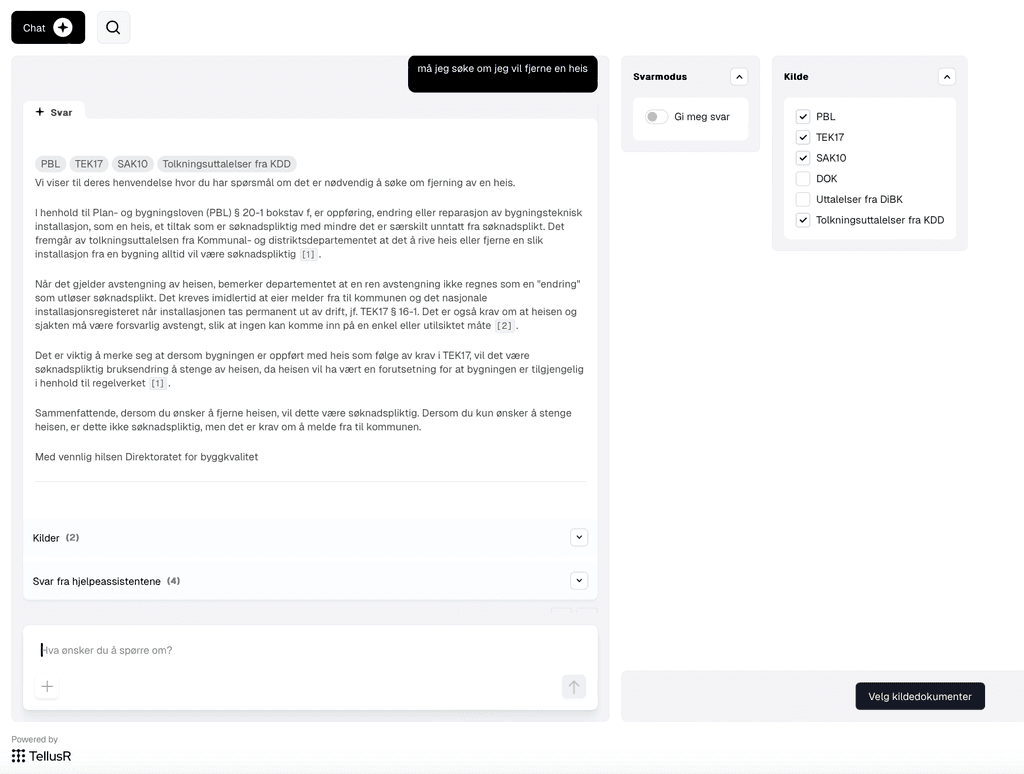
TellusR Assistants & Agents – chat interface screenshot

What can you build with TellusR?

With TellusR you can build, customise and operate AI assistants and agents as part of your organisation’s overall AI architecture. In the AI Communications Hub you get a single control point for data, language models, retrieval, access, integrations and workflows.

Build everything from simple chat assistants with access to selected proprietary data to advanced agent solutions that find relevant information, use tools and collaborate across systems. You can assemble specialised assistants with clear tasks and let them interact with a higher-level assistant for a domain or work process.

Get started quickly with ready-made setups, or build tailored solutions with your organisation’s data, instructions, models, integrations and work processes.

Build AI your organisation can trust. With control of data and models, precise retrieval, built-in testing and full traceability you get visibility into how solutions respond – and the tools to test, quality-assure, troubleshoot and improve them continuously.

Standard features

Retrieval

Uses TellusR AI Search as the retrieval component to find and rank relevant content across selected sources. Boost Graph: dynamic boosting and filtering of content using LLMs. Increases precision in context selection by exploiting knowledge of where chunks sit in the content structure or how they are categorised.

Assistant configuration

  • Support for building your own assistants and assistant pipelines.
  • Use preconfigured assistants with proven standard setups. Your first chat assistant against your own data is just a few clicks away.
  • Examples of predefined assistants: metadata generation from documents, document-level chat, and AI overview as an informative supplement to search results (AI Search +).
  • Support for MCP (Model Context Protocol).
  • Built-in prompt editor.
  • All functionality exposed via APIs.

Observability and quality assurance

  • Includes a test framework with both static tests and LLM-based evaluations, so you can validate changes, compare versions and catch regressions before production.
  • Full traceability and deep debugging across the whole chat pipeline, with insight into context, prompts, intermediate steps and generated answers – making troubleshooting and QA significantly easier.

Unique to TellusR

TellEm: logic in the prompt, not the model

Not everything in a conversation is a question for the language model. Formatting search hits, choosing instructions or checking that the sources exist should happen the same way every time. TellEm is a small, purpose-built scripting language in Dialogue that lets whoever owns the prompt do exactly that – deterministically, with no model call and no deploy.

The same answer every time

What can be computed should not be guessed. Scripts run the same way every time.

No model call

The logic runs exactly and for free – no tokens, no latency.

Safe in a sandbox

TellEm has neither loops nor recursion and runs with no access to the file system, network or shell. A script cannot hang or ask for more.

You draw the boundaries

TellEm rules decide when a tool is offered to the model, format search hits and narrow down which fields it may fill in.

The answer is checked

Validation rules check sources and format before the answer goes out. If a rule fails, the model is told and tries again.

Versioned with the prompt

Scripts are edited directly in the prompt editor and versioned together with the prompt – no separate deploy.

Less guessing. More control.

DiBK’s internal work tool Arkivslurpen is built on TellusR and processes the several thousand inquiries the directorate receives every year, extracting information from previous answers to make case processing in our response service faster and more accurate. It lets less experienced staff answer quickly and correctly, while we retain full control of data sources.
Kari Befring Bjørnstad Director for innovation and digitalisation, Norwegian Directorate for Building Quality

Key benefits

Value

Significantly faster information retrieval with AI chat than via traditional search or support systems.

Reduces errors and data leaks compared to open AI services – ensures sensitive information never leaves the organisation.

Increased employee productivity: immediate access to up-to-date, quality-assured information – fewer interruptions in the working day.

Modern user experience: the same functionality as familiar AI chat tools, but on your security terms – with no compromise on privacy.

Typical use cases

Works with systems such as

  • CRM systems (e.g. Salesforce, HubSpot) for customer follow-up and information.
  • ERP systems (e.g. SAP, Microsoft Dynamics) to connect AI chat to operational and financial data.
  • Intranets and internal document databases (SharePoint, Confluence) for regulations, HR and quality assurance.
  • Email and collaboration tools (Confluence, SharePoint, Teams, Slack) for AI-assisted information flow and dialogue.
  • Line-of-business systems and specialist databases (production data, operations systems, archives) where AI can fetch and deliver insight in real time.
  • External data systems and cloud APIs for controlled data exchange with partners, public registers or external information sources.

Partners

AcosRedpill LinproStiftelsen AstaEpinovaArtifexAI

Ready to see how it works?

Invest in insight, security and flexibility – not risk. Send us your most challenging use case!